
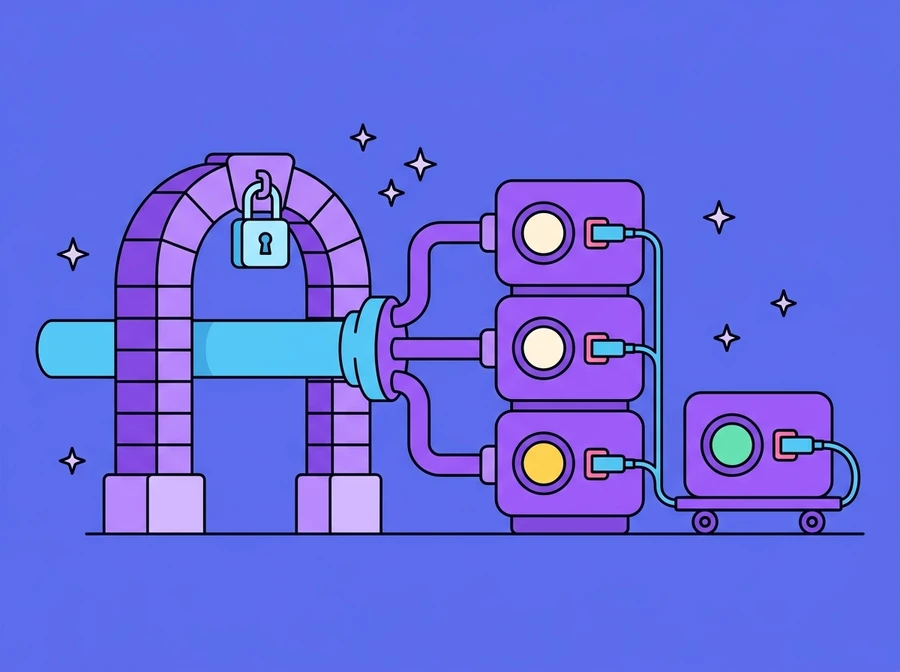
The work of getting a system off a developer's machine, onto the internet, and keeping it there as load grows. It covers the reverse proxy that lets several applications share one host and one public address by routing on domain name, TLS certificates that renew themselves, scripted deployment instead of commands typed one line at a time, releases that do not drop requests already in flight, health checks that reach the port rather than stopping at the process, supervision that restarts a service when it dies, logs you can actually search at 2am, and scaling, both a bigger machine and more machines behind the proxy.
Who it is for
Organisations with a system that is built but has no dependable way to go live, teams looking after several applications on one set of infrastructure, and businesses already running in production who find out they are down when a customer calls to tell them.
Several applications on one host, with a single public door
Several web applications can share one machine without competing for the public port. The way we run our own estate is that each application listens on a loopback port of its own, with nginx in front as the single public entrance: it reads the domain name the visitor asked for and hands the request to the application that owns that domain. Adding a system means one more port and one more virtual host, not another server and not another public address. Around twenty of our own applications run on one host this way, each with its own virtual environment and its own version of the language.
The mistake we see most often is an application bound to every interface, because that leaves its port open directly to the internet, reachable without TLS, however carefully the proxy in front of it has been configured. So we bind every application to loopback on purpose, and let nginx be the only door. Certificates come from Let's Encrypt and renew automatically, with one certificate covering several names in the same family. Rules that every site needs, such as closing off the framework's own API documentation pages and any file whose name begins with a dot, live in shared include files pulled into every virtual host, because a rule you have to remember to add per domain is the rule that will be missing from one of them. We added ours after a scanner pulled exactly those files off neighbouring sites.
- Each application on its own loopback port, with its own virtual environment and language version
- nginx picks the destination by domain name, so many domains share one public address
- TLS from Let's Encrypt, renewing automatically, one certificate covering several names
- Nothing bound to every interface, so there is no entrance that bypasses TLS
- Shared deny rules included in every virtual host, for API documentation pages and dot-files
Deployment is a script, not commands typed on the night
Going live by typing commands one line at a time only works if the person typing remembers every step and gets every character right, which is not something to leave to memory. So the whole sequence is a script: writing the virtual host file, requesting the certificate, wiring up automatic renewal. The tenth deployment then goes the way the first one did, the same script serves the next domain, and anyone else on the team can read it and see how the machine is configured. Before every certificate request we run a probe from outside the network to confirm the outside world can actually reach the machine. That step matters more than it sounds, because a test from inside the same network can pass by looping back at the router while every request from outside is being blocked, and the certificate authority is out there with them.
A release should not lose the requests that are in flight while it happens. The new version starts alongside the old one and gets no users until it answers a health check on its own port. Only then does the proxy point at it, while the old version finishes the requests it has already accepted before being shut down. It stays in place until the new one has proved itself, because the fastest fix for a bad release is putting the previous one back, not debugging live while everybody waits. Every deployment writes its own log, so afterwards you can see which release changed what, and when things started to break.
- One script covers it: virtual host, certificate request, automatic renewal
- A probe from outside the network before every certificate request
- The new version starts alongside the old and must pass a health check before the switch
- Requests already accepted finish on the old version before it is stopped
- Rollback stays available, because the previous version is kept until you are sure
- A separate log for every deployment, so you can see what a release changed
Check that the port answers, not that the process exists
Monitoring that asks whether the process is still running is exactly how an outage goes unnoticed. A process can be alive, still holding its PID, still present in every process list, and no longer listening on its port: it hung, it lost its listener, or it never finished binding after a restart. To the user that is a site that will not load, while the monitoring screen stays green. So our check opens a real TCP connection to the port with a short timeout, and a service counts as healthy only when the process is alive and the port answers. Where more is at stake, the check calls an endpoint that touches the database, because a web server will answer politely long after everything behind it has gone.
Each service is started in its own process group, so restarting the supervisor does not drag the services down with it. The process id is recorded, the real status is checked at boot rather than assumed, and anything that has died is started again. The trap at this step is the restart that fails because a leftover process from the previous run still holds the port, after which the supervisor revives it every few seconds in a loop that never ends. Clearing that up has to be specific: the process must actually be listening on that port, and its command line must actually name that application. On a host where twenty systems share the same entry filename, matching on the name alone will one day kill someone else's service, and we have watched a single kill-by-name take several live sites down at once.
At 2am the first question is which file to open. Every service writes its own log, stdout and stderr together in one place, kept apart from the deployment logs and the environment setup logs. Lines carry a timestamp and enough context to search back for what happened just before. A log that exists only in a terminal window someone has since closed does not count as a log.
- Health checks open a real TCP connection to the port, not just look for the process
- A service counts as up only when the process is alive and the port answers
- Where the stakes are higher, the check reaches an endpoint that touches the database
- Each service in its own process group, so a supervisor restart does not take it down
- The PID recorded, real status reconciled at boot, dead services started again
- Leftover processes cleared by port and command line together, never by name alone
- One log file per service, kept separate from deployment and environment setup logs
A bigger machine and more machines solve different problems
There are two ways to scale, and they are talked about together often enough to be confused. The first is to make the existing machine bigger: more processing, more memory, a faster disk. It is quick, it needs no code changes, all the state stays in one place, and there is no question of sharing sessions or files. It addresses the problem it is for, a machine running out of resources, and it does nothing at all for availability. That machine is still the single point whose failure takes everything with it, a restart is still time when nobody can get in, and the price curve gets steep as you climb towards the top of the range.
The second is to run several copies of the application behind the same proxy and let the proxy spread requests across the copies that are still answering. That lets you take one out at a time, to update it or because it has failed, while the system keeps serving. It comes with conditions to settle first: the application must not keep state to itself, sessions have to move somewhere every copy can see, files uploaded by users must not live on one copy's disk, and scheduled jobs need something to stop every copy running the same job at once. Most importantly, the database is usually the real bottleneck, so adding front-end copies moves the pressure onto it rather than taking the pressure away.
So we measure first: where the time in a single request actually goes, between waiting on the database, waiting mid-request on an external service, and real computation. Plenty of the systems we see are not limited by how many machines they have. They are limited by one slow query that every page calls. Adding machines in that case means paying several times over to keep the same problem.
- A bigger machine is quick and needs no code changes, but stays a single point of failure
- More copies behind the proxy let you take one out to update it, or when it fails
- Sessions, uploaded files and caches have to move somewhere every copy can see
- Scheduled jobs need something to stop every copy running the same job at once
- The database is usually the real bottleneck, and more front ends move pressure onto it
- Measure before scaling: find out what a request spends its time waiting for
What it does
- Domain routing through one reverse proxy, so several systems share a host and an address
- TLS from Let's Encrypt, renewing automatically, one certificate for several domains
- Repeatable deployment scripts, with an outside reachability probe before every certificate
- Releases that keep in-flight requests, and a rollback that stays available
- Health checks at the port, not just a look for a running process
- Supervision that restarts a dead service and reconciles real status at boot
- Separate logs per service, per deployment and per environment setup
- A scaling plan for both a bigger machine and more machines, and what each one fixes
Want something like this?
Tell us your situation and we will work out what needs adapting to fit it.